

Hi,
I am an employee having trouble getting file/folder information via Box API. With enterprise admin's help, I created an authorized App and created an AppUser. Using server authentication, I was able to create folder, upload files into the folder, and add collaborators into the folder. However, when I tried to get folder information, I always received 'insufficient permission' error. As a comparison, I created a new folder and got folder information immediately. The error was still there.
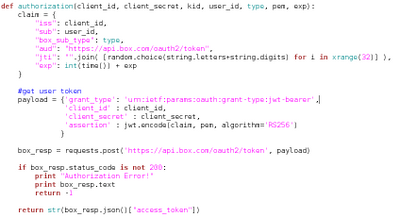
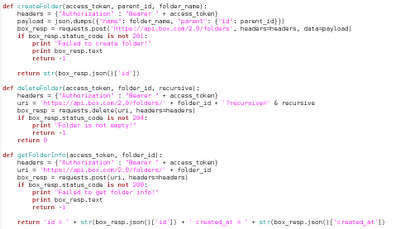
Following functions were used in this work:
1. to get access token:
2. folder operations:
3. The script used to get folder information:

I always saw
{"type":"error","status":403,"code":"access_denied_insufficient_permissions","help_url":"http:\/\/developers.box.com\/docs\/#errors","message":"Access denied - insufficient permission","request_id":"qgn0b0flyhmimv2c"}
What permission do I need to get folder/file information? If anybody encountered similar issue, please please please share your experience.
Many Thanks!
Yi