
Question

Allow collaborators at a folder level

  • May 20, 2025
  • 1 reply
  • 141 views

We used to be able to create a folder anywhere in our parent folders and invite outside collaborators to the folder. Not sure what changed.

Our business requires clients to upload files—which we still can do with File Requests.

However, we also prefer them to organize their folder while they finalize all the uploads.

We used to be able to do this but only recently have been receiving the following message:

Collaboration invitations can only be sent to people within [organization]


From the support page, I only see the options to allow whitelist in the admin console. In the past, we just invited them from right clicking and sharing or adding as a collaborator in the web app or Finder.

1 reply

Rona Box
  • Community Manager
  • May 22, 2025

Hi ​@vince-mavp

Welcome to Box Community and we’ll be assisting you in resolving your collaboration error! 


If you’re receiving error inviting external collaborators, it could be that the external collaboration is restricted to this folder. 


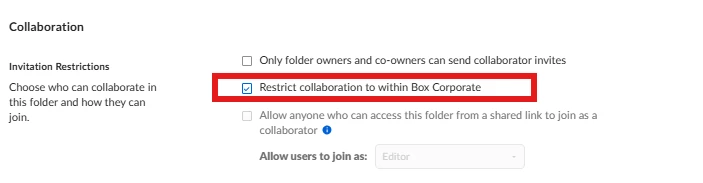
You may want to confirm if the ‘invitation restrictions’ in the folder settings is enabled: 

  1. Login to Box.com and hover over to the folder, click More Options then go to Settings. 
  2. It’ll take you to the folder settings and in the Collaboration section, un-check Restrict Collaboration to within ‘your company name’ if it’s checked.
  3. Don’t forget to Save Changes and once disabled, please try resending your invite. 


Note: If it’s grayed out in the sub-folder level, kindly navigate to the first-level folder settings to disable it. If it’s a collaborated folder in your part, you can reach out to the folder owner to reconfigure the setting. 


In addition to this, this limitation can also be an Account-level restriction. If that’s the case, you should reach out to your primary Box Administrator. 


Hope it helps! Please let us know if you need additional assistance.