Hi @Desiree,
Welcome to Box Community, and we’re here to help in granting collaborators with co-owner access to your folders.
You should begin by inviting this person as collaborator to the folder and grant him/her with Co-Admin permission.
To invite someone to collaborate in a file or folder:
- Open the Share window. To do this, in your Box files view, hover over the row of the file or folder you wish to share.
- On the right, click Share.
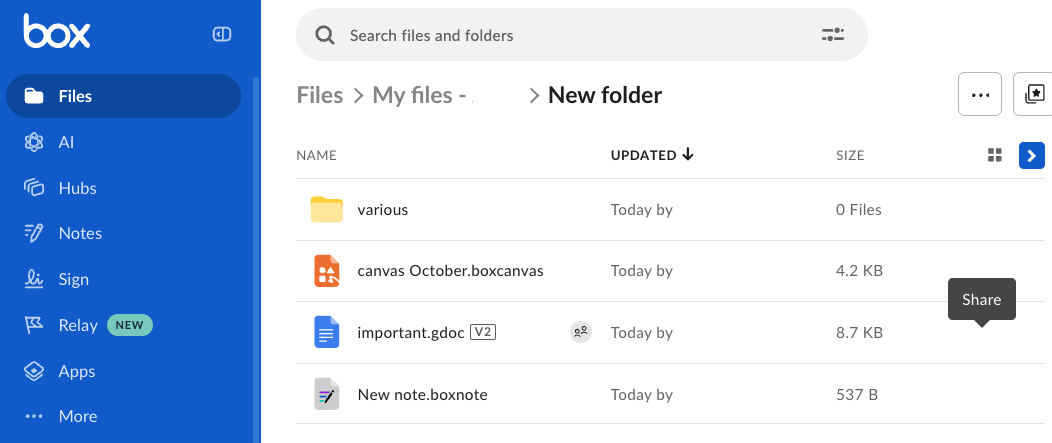
- The Share window opens.
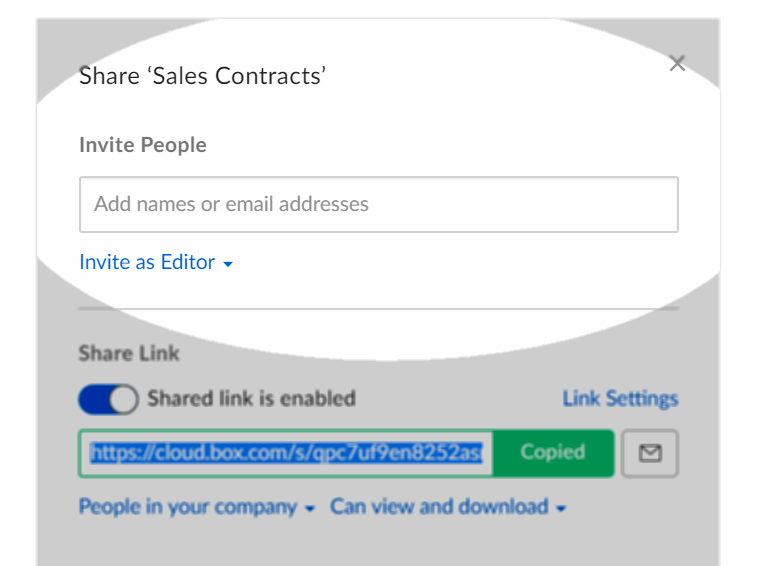
- In the Share window, under Invite People, click Add names or email addresses.
- Type a collaborator’s name or email address.
- As you type, Box anticipates your intended recipient and lists corresponding email addresses. You can select the recipient you want, or continue typing the full email address.
- When typing full email addresses, separate recipients by a horizontal space.
- Click the Invite as drop-down menu. Box displays a list of roles.
- Click the role you wish to assign to the collaborator, (select Co-Owner).
- (Optional) In the Message field, type a message of up to 750 characters for the collaborator.
- Click Send.
Hope it answers your question! Let us know if you have questions and clarifications.

