I created an account for my boss, if we want to add additional accounts, do we add to the original account or does each admin need to have their own?

Solved
Additional users
Best answer by Rona Box
Hi
Welcome to Box Community, and we’re here to help in adding new users, as well as granting Admin permissions.
If you plan to increase your users in this account, you can proceed and add new managed users, meanwhile if you are looking on granting select users with admin access you can elevate them as your Co-Admin.
To grant a user Co-Admin permissions:
- Go to Admin Console > Users & Groups.
- Click the Managed Users tab.
- Click the name of a managed user with a Role of Member.
- Hover over the Role and Access Permissions section and click Edit (
 ).
). - In the Role drop-down list, select Co-Admin.
- Select which Co-Admin permissions you want the user to have. For example:
To determine if your admin needs other permissions, review the complete Co-Admin Permissions list.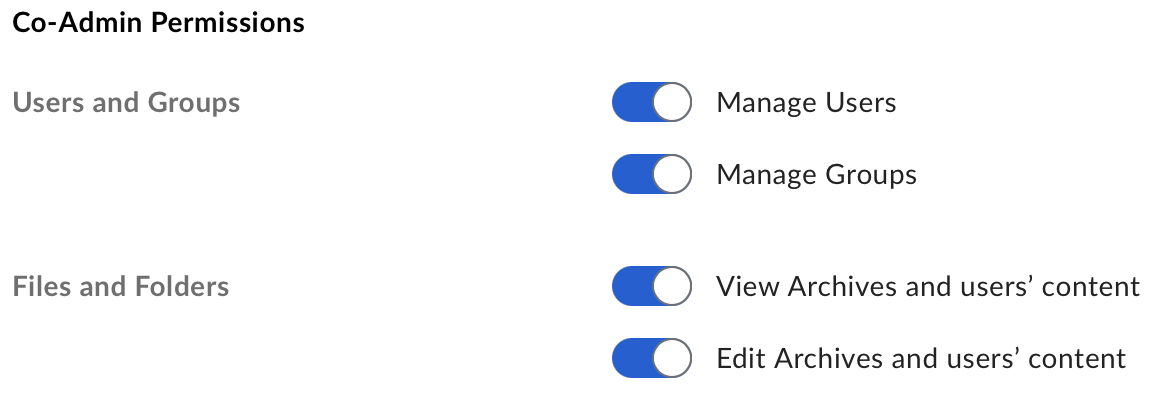
- Click Save.
For more details in granting user with Admin access, please checkout this article.
Hope it helps! Let us know if you have questions.

Sign up
Already have an account? Login
Community access is available only with a Box Account.
Sign in with your Box AccountSign in to the Box Community
Community access is available only with a Box Account.
Sign in with your Box AccountEnter your E-mail address. We'll send you an e-mail with instructions to reset your password.