Question

Adding users to available seats

  • March 4, 2026
  • 5 replies
  • 128 views

Hi, 


I have two seats available under my plan, and am trying to add two colleagues to these seats. However, when I add them, I am only given the option to purchase two additional seats. I don’t need to purchase more seats, just assign users to empty ones. How can this be resolved without unnecessary extra charges to my account?

5 replies

  • Author
  • New Participant
  • March 4, 2026

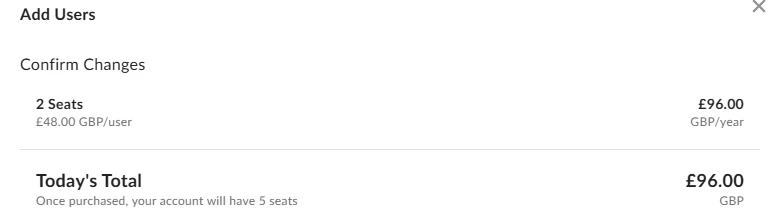
This is the prompt I get when I try to add users- I do not need 5 seats, only 3. 


Rona Box
  • Community Manager
  • March 5, 2026

Hi ​@s.moore1

Welcome to Box Community, and let me help check out your Box Starter’s available seats! 


Upon review, it appears that you’ve already used up all your (3) seats. You can verify it via Admin Console>  Users & Groups> Managed Users tab. 


If you are to add more users, you will be prompted to add or pay for more seats. For more details, you may also visit the article, I Have More Users Than Seats Error


Hope it helps! If you have questions, please let us know. 


  • New Member
  • May 6, 2026

Hello, 


Has anyone figured out a resolution to this issue? I just subscribed today with 3 seats and have not been able to even assign the other 2 seats to my colleagues. What do I need to do here?


  • New Member
  • May 10, 2026

I am having this issues as well. I am just on the free trial. 


  • New Member
  • May 18, 2026

I am also having the same issue! It’s just me and I have 3 seats. I want to add my two other colleagues but when I try to add a new user, it asks me to purchase them. I am on the free trial so I’m not sure if that is affecting it? I can’t really trial the product without testing it with my team.