


Video Watermarking is now GA

  • January 29, 2026
  • 4 replies
  • 101 views

Jey Bueno Box

Watermarking is now fully supported for video files, allowing organizations to extend the same level of content protection to multimedia as they already do for documents. We are also supporting download of the watermarked video.


This release of video watermarking capabilities includes:

  • Applying default or customized watermarks to content, manually or via classifications
  • Preview videos with watermarking, both in webapp and mobile
  • Watermarking on downloaded video content for users with Viewer level permissions​​​​​


Check out the product announcement for more details.


Additional resources:
 

If you’re planning to use video watermarking, what workflows or scenarios are you hoping it will support? Feel free to share questions or use cases in this thread so we can help you get the most out of the feature.

4 replies

  • New Member
  • April 3, 2026


I am subscribed to the Enterprise Plan for businesses, 

but I am unable to add a watermark to my videos. I tried today with .mpg, .mp4, and .mov files, but it didn’t work. 


Please let me know what I should do.


Best,


Teiji Yamamoto


Jey Bueno Box
  • Author
  • Community Manager
  • April 3, 2026

👋 Hi ​@TYTY, welcome to the Box Community! I’ve moved your post to this related community article about video watermarking.


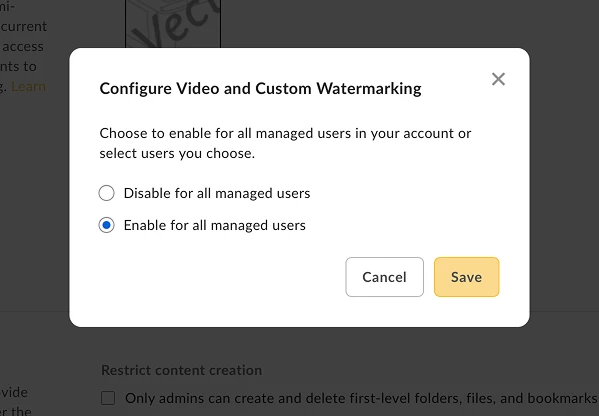
Please verify that video watermarking is enabled by navigating to Admin Console > Enterprise Settings > Content & Sharing > Video Watermarking > Edit Configuration.


Note: You must be an Owner, Co-owner or Editor of a file or folder to set and remove a watermark. Watermarks can be applied to either individual files, or to all files within a folder.


To learn more about video watermarking, please visit:


If you need further assistance, please submit a ticket to our Product Support. Thank you, and I look forward to getting this resolved.


  • New Member
  • April 6, 2026

@Jey Bueno Box    Thank you for letting me know. I went to the Admin Console, checked the “Enabled for all managed users” box, and saved the settings. However, when I try to enable “Enable watermarking for this file” by selecting ‘Settings’ from the “...” menu on the actual video file (.mov, .mp4, .mpg), I get an alert saying, “Watermarking is not supported for this file type,” and I can't proceed. Please let me know what other steps I need to take.


Jey Bueno Box
  • Author
  • Community Manager
  • April 6, 2026

Hello ​@TYTY, thank you for bringing this up.


To check your account settings and further investigate the issue, I have submitted a ticket on your behalf. You will receive your case # via email for reference. Please keep an eye out for an email follow up from our Product Support team to continue assisting you.


Thanks for your patience, and I look forward to getting this resolved.