

Thanks to everyone who joined our live hands-on Box AI workshop! We had an incredible turnout from customers around the world, all eager to explore what’s possible with Box AI. A special thanks to Eleonore Hebrard, for leading the session.
During the workshop, participants built and tested their own Box AI Agents, learned how to set up workflows, and explored practical use cases like contract review, onboarding, and RFPs. A recording of the session is now available below, so you can catch up anytime.
Box AI Studio Overview
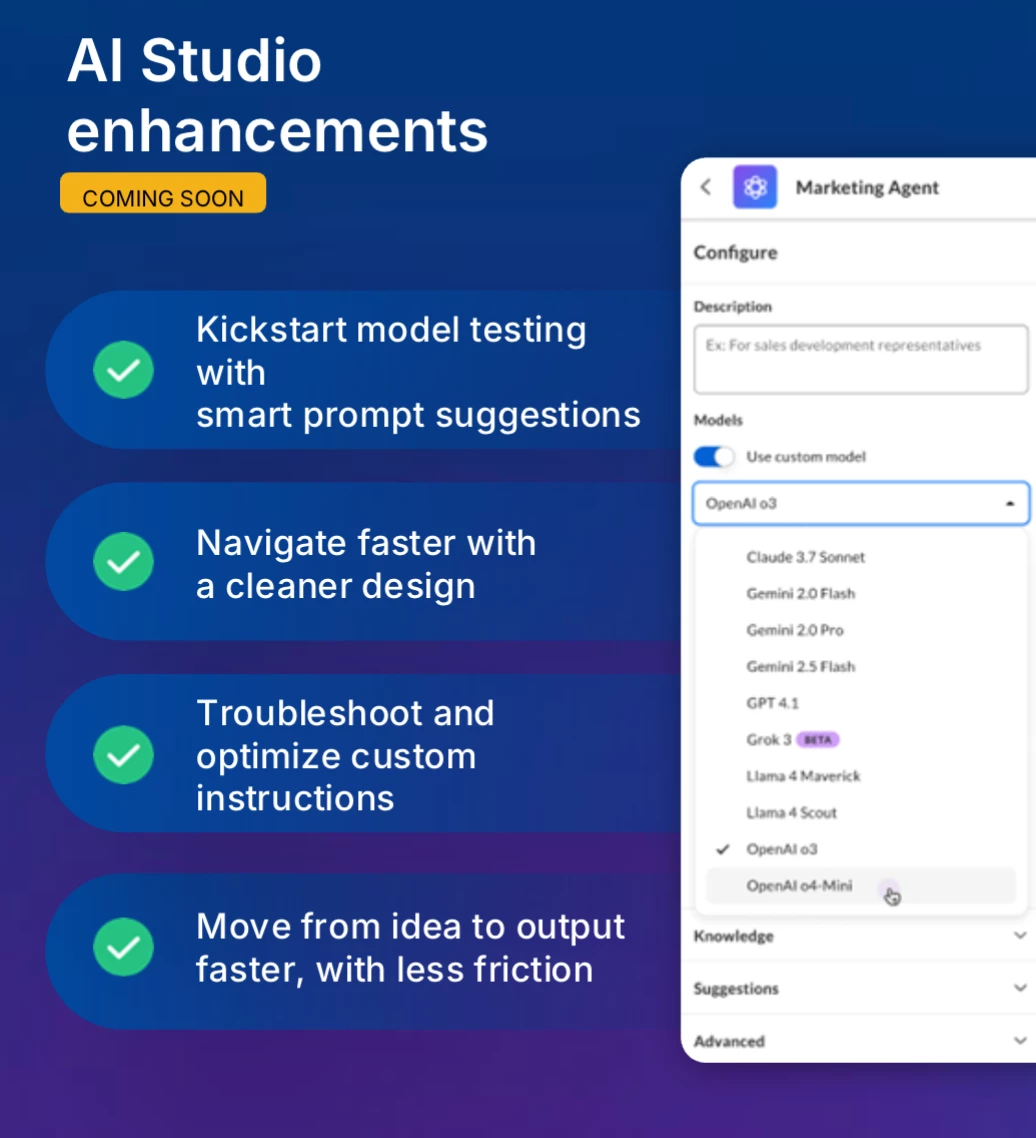
Eleonore, delivered an overview of Box AI Studio, a no-code tool to build AI agents directly within the Box environment. She explained how these agents can analyze and interact with content stored in Box: “The agents respect your permission, your security, and your compliance requirements.”
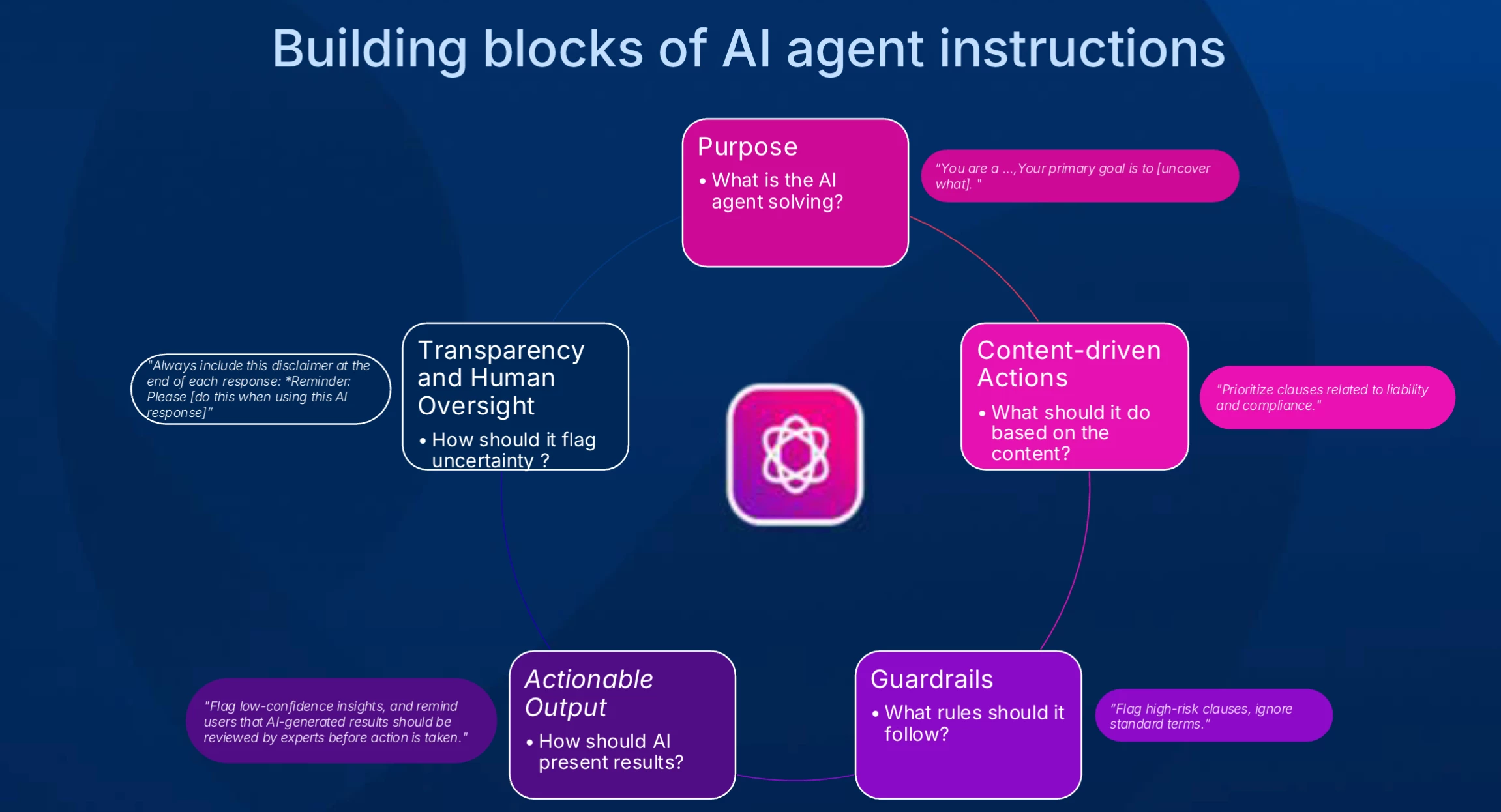
Eleonore stressed the significance of human review in AI workflows, ensuring agents augment—not replace—human tasks. “Every output should be reviewable by a human... This really ensures that agents support and enhance human work rather than replace complete end-to-end tasks.”
Hands-On Demonstration
The workshop included a detailed demo where Eleonore walked attendees through creating and configuring AI agents. She showcased use cases for both legal contract review and financial services KYC (Know Your Customer) processes.
Legal Contract Review
Eleonore demonstrated how Box AI agents could function as "paralegal assistants," helping legal teams triage contracts, identify risks, and highlight missing or nonstandard clauses with impressive speed:
“A task that typically takes a legal analyst one or maybe even two hours can now be completed in seconds.”
Key features of the AI agent’s output for legal workflows include:
-
Executive summaries
-
Key terms tables
-
Clause-by-clause analysis
-
Risk flags and actionable recommendations
KYC Document Analysis
Eleonore demonstrated another use case focused on automating cross-document analysis for loan origination and fraud detection. KYC agents efficiently verified applicant data across multiple documents, such as payslips, tax returns, and bank statements. She illustrated capabilities like:
-
Cross-document correlation
-
Fraud detection
-
Consistency checks
-
Audit trail generation
Eleonore emphasized the scalability of Box AI agents, capable of analyzing up to 20,000 documents simultaneously:
“Instead of having to go through the different places and look for the different elements and making some mistakes, here you can completely automate this task.”
Interactive Q&A Session
Key discussions included:
Prompt Customization
One attendee asked about customizing the default AI prompt in Box, particularly for unique cases like quizzes:
“The default is ‘ask questions about this content,’ but I’m playing around with a quiz me agent, so a better note would be something like ‘input your answer here.’”
The team acknowledged feedback, noting that use-case-specific flow customization was an area of focus.
Token Notifications and Exporting Results
Attendees asked about notifications when running out of Box AI tokens and exporting agent results beyond copy-paste functionality. The Box team highlighted these limitations were being addressed, emphasizing ongoing improvements.
Democratizing Agent Creation Permissions
A recurring theme was whether Box AI Studio could expand access for non-admins to build agents. Eleonore acknowledged the demand for better scalability:
“I’ll bring it back to the product team... If you truly wanna democratize it, not if you wanna expand it to, say, hundreds of people.”
Building Agents and Practical Tips
Eleonore provided step-by-step instructions for crafting AI agents within Box AI Studio, detailing aspects like model selection (e.g., OpenAI GPT-4.1 for legal use cases) and prompt engineering. She advised participants to test different LLMs (Large Language Models) to find the best fit for their use case before production deployment. She suggested using Box studio’s sandbox for experimentation and testing AI prompts.
We’d love to hear from you:
- If you attended, what use cases did you start building with your Box AI Agent?
- If you couldn’t join, which use cases are you most excited to explore next?