Extending Box for Salesforce with Box AI Data Extraction capabilities

  • December 29, 2025
  • 7 replies
  • 140 views

daria

We all strive to make Salesforce our single source of truth, but keeping records in sync with the documents behind them often takes more manual work than it should. Teams spend time reviewing contracts, invoices, and forms stored in Box, then re-entering key details into Salesforce. That extra effort slows productivity and increases the risk of simple errors.

Earlier this month, we introduced the Box AI Data Extraction in our Salesforce managed package.

Box AI Data Extraction for Salesforce integration leverages Box AI’s intelligence to automatically extract structured data from documents stored in Box and seamlessly create or update Salesforce records. 

This capability connects Box content with Salesforce data to accelerate data entry, improve accuracy, and streamline business workflows.  
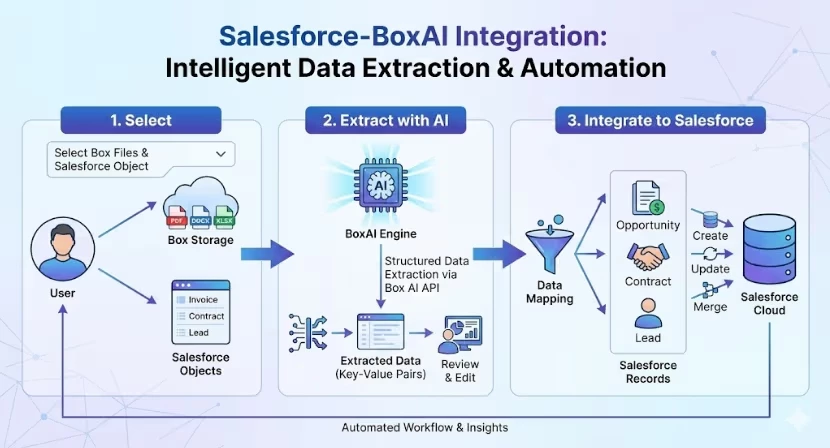
Box Extract capabilities are available in Salesforce Lighting Pages, Record Pages, Lightning Utility bar and flows, and can be configured by your Salesforce admins.

Capabilities of the integration include:

  • Automated data extraction: Instantly capture structured data and metadata from Box documents.
  • Flexible extraction modes
    • Create New Record: Create new Salesforce records from extracted data.
    • Update Existing Record: Update existing records with new document information. 
    • Validate: Compare extracted data with existing Salesforce values.
  • Review and validation: Accept, reject, or edit extracted fields inline before saving.

Box AI Data Extraction for Salesforce integration helps teams work faster and more accurately by automating data capture from Box documents. The integration removes manual data entry, keeps Salesforce records up to date, and ensures information stays consistent across systems as your records volume grows.
7 replies

  • New Participant
  • January 4, 2026

I’ve been trying to find how to use Box Extract from LW component. I have Enterprise plus but it seems they say I dont have access


daria
  • Author
  • Box Employee
  • January 5, 2026

@NLeo Box AI Data Extract Lightning Components are available in the latest Box for Salesforce v5.24 release. Please make sure your Box for Salesforce package is updated to the most recent version.

If the issue persists after upgrading, please reach out to Box Support so our team can assist you further: https://support.box.com/hc/en-us


  • Participating Frequently
  • January 15, 2026

Hi ​@daria,

Thanks for sharing this, can you please point to the permissions or other settings that need to be set up.  We were testing the basic functionality for BOX <> Salesforce Agentforce integration and were unable to have the Agentforce access the Box data in the folders.

It would be very helpful if you can provide point to the checklist of the permissions that need to be enabled for the Agentforce to see the data in Box folders.

Thanks in advance!


daria
  • Author
  • Box Employee
  • January 16, 2026

Hi ​@sunil , 

Thank you for sharing your question and for taking the time to test the Box for Agentforce integration.

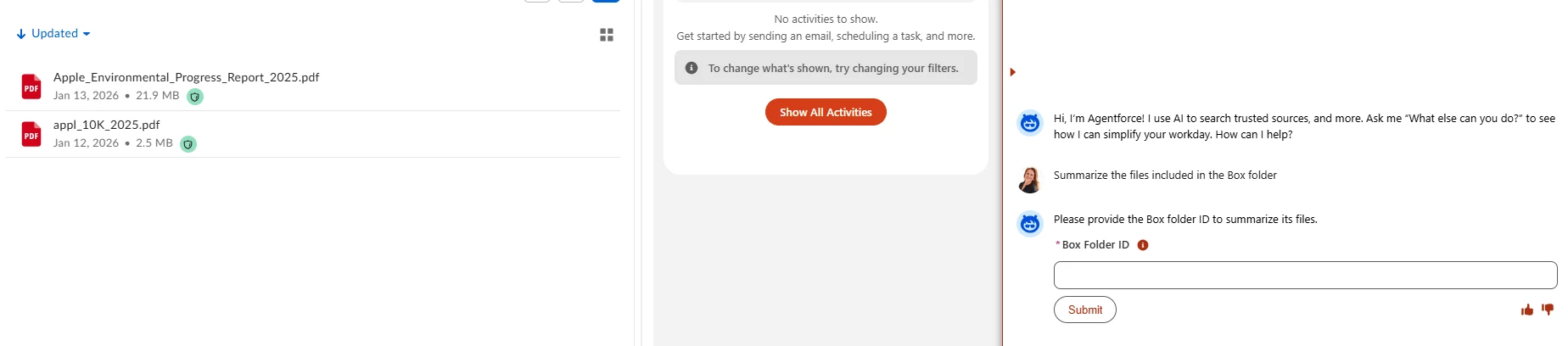
Box for Agentforce package functions as an extension to the Box for Salesforce managed package. As such, all initial setup and authorization must be completed within the core Box for Salesforce managed package before Agentforce can access any Box content. The Box Folder ID, which is required based on the screenshot you referenced, can be located by navigating to the relevant folder in Box and copying the folder ID directly from the URL in your browser.

If the Box for Salesforce managed package is correctly set up and configured, but the Agentforce agent is still unable to access Box, we recommend opening a support case at https://support.box.com/hc/en-us including details about the Box for Agentforce topics and actions you are using. Our team will then be able to investigate this further and help you resolve the issue.

Thank you,
Daria


  • Participating Frequently
  • January 16, 2026

Hi ​@daria,


Thanks for the response.

We followed the following steps:

  1. Installed the Box app for Salesforce app exchange
  2. installed the extension package for Salesforce Agentforce
  3. Created a new employee Agent -- and assigned it to a user so I am able to access the new agent that i created through Agentforce.

    WHAT IS WORKING?
    - For a new account, there would be no new folders there.  So I am able to upload the data directly from the Salesforce. Further, I can see the docs uploaded in Box account. So this is great -- as this is     working as expected.

WHAT IS NOT WORKING?

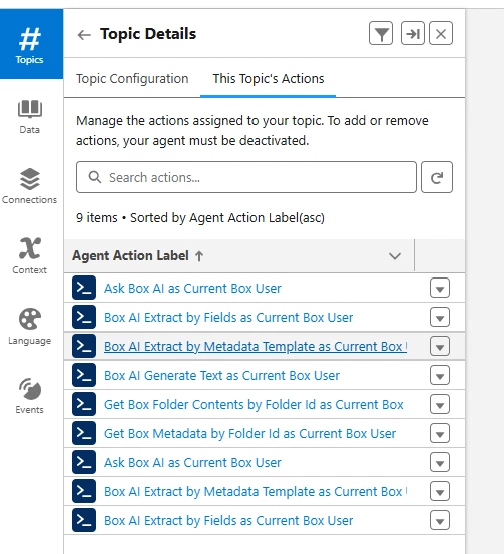
  • When I select the new employee agent that I created -- (see screenshots below of the topics included), the Agentforce does not recognize that there is any document in Box.
  • I created a sample account for Apple -- and uploaded the Form 10K there.  As I would typically do using Box AI, I would query the document in box, BUT I want to do this with Salesforce interface (Agentforce).  

WHAT I NEED FROM YOU?

  • Do you have a checklist of the topics or permissions that I need to enable for Agentforce to be able to AUTOMATICALLY get the folder ID so I can query the document right from Agentforce interface.
  • If you already have specific guide, that is greadt, but it would be great if you can create a short resource guide to get this working.

Thanks in advance -- as always and being so responsive! :)

  1.  


  • Participating Frequently
  • January 16, 2026

Hey ​@daria

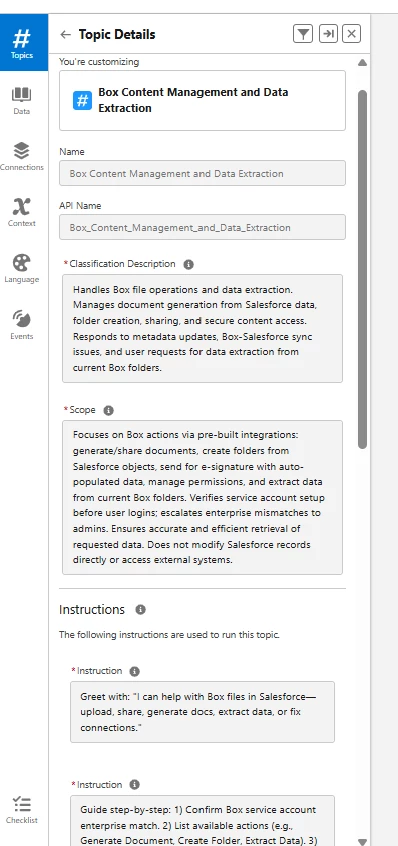
It seems that I need to have very specific “Classification description” -- can you provide some minimum required instructions that need to be included so the agent can pull the information from the current account. 

Thanks in advance!


daria
  • Author
  • Box Employee
  • January 19, 2026

Thank you, ​@sunil !

For custom Topics, there isn’t a one-size-fits-all guide since every workflow can be different. A helpful approach is to look at the inputs and outputs of the Box actions you want to use, and then design your Topic to gather those inputs and guide users through the interaction. You can also try the out-of-the-box Box AI Topic that comes with Box for Agentforce to see how interactions with Box AI are structured.

Hope this is helpful!