
Box Search 3.0 Community Roundtable Q&A

  • June 3, 2026
  • 1 reply
  • 52 views
vnallamala

Welcome to the Q&A summary from our recent Box Search 3.0 Community Roundtable.


During this session, community members joined Box product experts for a deep dive into the major architectural upgrades behind Search 3.0, upcoming roadmap investments, and practical strategies for getting the most out of the new search experience.


Below, you will find answers to the most frequently asked questions during the roundtable, covering everything from API enhancements and metadata filtering to our exciting upcoming multi-modality search capabilities.


Customer Question

Box Comment/Answer

what is NEW with search 3.0?


Is there any formal documentation about the Search 3.0 release?  Perhaps you will share the materials that were reviewed during this session?


See: 


Does Search 3.0 include the API searches or just via Box.com or Box Drive?

All modalities. Both API and UI (webapp, mobile, and Drive)

Is there a way to tell which search version you are on?

Box Search 3.0 represents a major architectural shift in the platform's search infrastructure that has been completely rolled out to all customers (it is Generally Available / GA).


Because it is a foundational, backend infrastructure upgrade rather than a separate user-facing toggle, all users are automatically on the new Search 3.0 engine across all modalities (Web app, Mobile, and Box Drive).

We were really hoping that there might be a new Search endpoint that only looks at exact file name match instead of the 'fuzzy' search that also looks for character patters inside the content of the files themselves too

In the Search API:

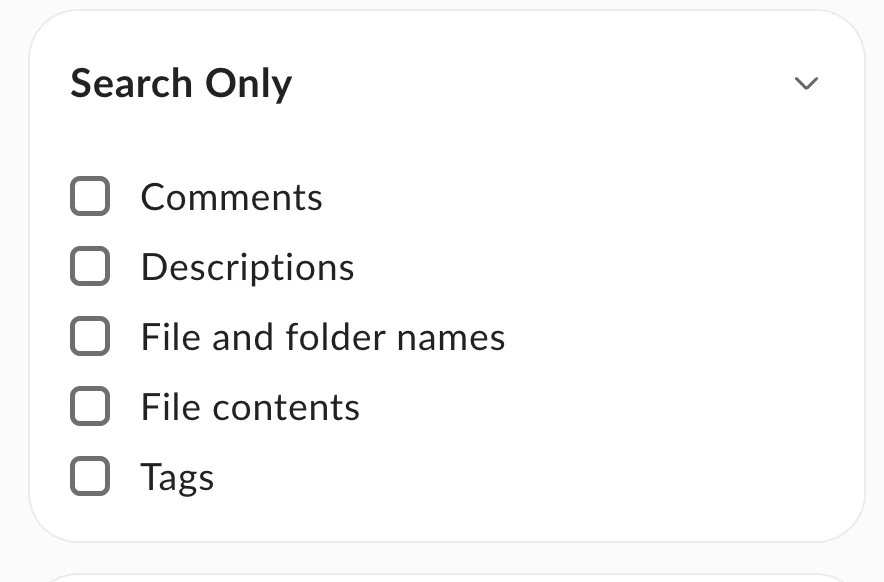
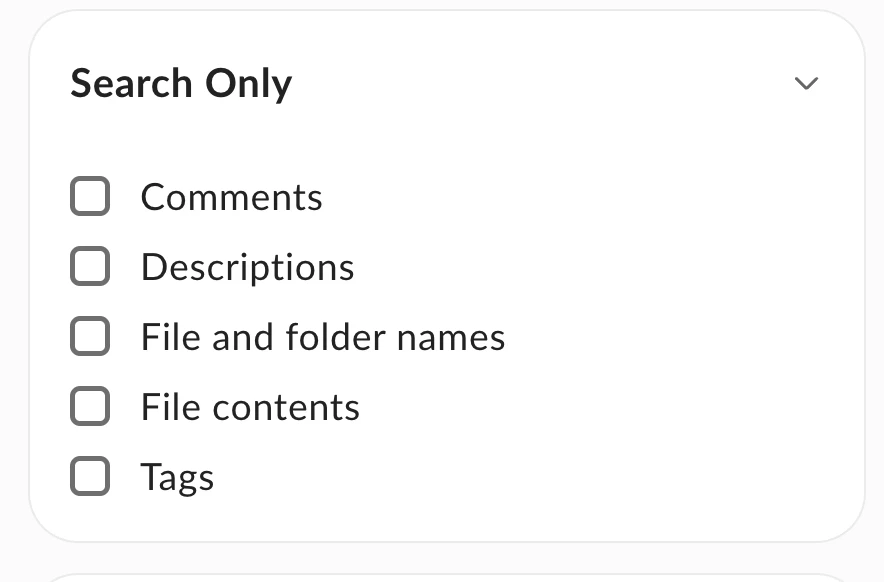
You can restrict your search to filenames by using the Search Within parameters or by utilizing the Only search titles filter. In the API, this is typically handled by passing specific query parameters or metadata filters (such as query combined with scope filters) to restrict the search index to file and folder names only.


How to Perform an Exact Match (Avoiding Fuzzy/Character Pattern Matching)

  • Use Double Quotes (" "): To prevent fuzzy matching or character pattern matching inside the content or name, you should wrap your search query in double quotation marks (e.g., searching for "Project Plan v1" instead of Project Plan v1). This forces the search engine to look for the exact phrase rather than splitting the terms or applying fuzzy matching logic.


In the Web UI

Box has introduced a new quick filter called "Only search titles" (which is the same as selecting the "File and folder names" option under the "Search Within" filter). When this is active, Box search bypasses full-text content indexing and only matches your query terms against the actual names of files and folders.


I also do not like the "default to current folder" in the search feature. It should default to global and allow us to toggle to "current folder"


We get the same complaints about the location the search defaults to quite frequently.

We are working with the frontend team to improve the experience.

When using metadata filters to search, we have a few taxonomy fields in one of our key templates. It would be very helpful for us to have those fields as filters also.


Agree. Would like to have ability to cite specific metadata in the search, specifically Uploader/Author

Good point. We added taxonomy as a new Metadata field type last December. We'll be working on supporting it in Metadata filter of Search. Currently, only Metadata Query endpoint supports taxonomy.

is the first 10,000 character limit in a file that is indexed for search still in place?

Lifting the 10,000-character limit for full-text indexing is actively on the roadmap. In the meantime, we can evaluate high-priority customer cases individually to help accommodate longer documents.

I thought Box Search with AI lifted the limited to first 2MB (not the 10k bytes limit)

This is currently applied only to the files stored within Hubs so it’s only for Q&A. Increasing the 2MB cap for Q&A is also on our roadmap.

we haven't turned on Box AI yet.. If we turn it on and we don't like it, can it be turned off? 

Yes, you can turn AI on and off for the Enterprise ID in the Admin center.

Does any of this apply to Box Drive searching?

Box Drive uses the public API and get's all the benefits from Search 3.0

Have there been considerations given to a Search API endpoint that doesn't consider file contents but instead just looks for File Name matches?


Yes - Exactly - Because our searches are starting at a very high folder-level (we don't know where the file lives), you deem our queries to be "Expensive".  We were hoping if we could just search the index by file name and not content, that would help.  If there's a different way we should be doing this, Query vs. Search, that may help


I can echo this sentiment, it would be nice to search by filename and metadata but ignore file content. In most of our use cases searching by file content is redundant and would use up unnecessary resources.

In the Search API:

You can restrict your search to filenames by using the Search Within parameters or by utilizing the Only search titles filter. In the API, this is typically handled by passing specific query parameters or metadata filters (such as query combined with scope filters) to restrict the search index to file and folder names only.


How to Perform an Exact Match (Avoiding Fuzzy/Character Pattern Matching)

  • Use Double Quotes (" "): To prevent fuzzy matching or character pattern matching inside the content or name, you should wrap your search query in double quotation marks (e.g., searching for "Project Plan v1" instead of Project Plan v1). This forces the search engine to look for the exact phrase rather than splitting the terms or applying fuzzy matching logic.


In the Web UI:

Box has introduced a new quick filter called "Only search titles" (which is the same as selecting the "File and folder names" option under the "Search Within" filter). When this is active, Box search bypasses full-text content indexing and only matches your query terms against the actual names of files and folders.


We have particular folders with protected data that we would like to exempt from AI-aided search.  Is there anything on the roadmap to allow us to disable AI access to certain folders?


Wasn't addressed, but it would be nice if I could mark folders to be EXCLUDED from search. I assume the idea is to just archive those folders, but I just have access to a ton of folders that 99.99% of the time I don't need to search within. However, that data is still relevant to me at times or to others and I wouldn't want to remove them for everyone.

All Box Search capabilities, including Box AI, strictly respect existing user permissions. If a user does not have access to a folder, Box AI will not search or access it. For further isolation, users can leverage Box Hubs to restrict search scopes, as searching within a Hub excludes all data not explicitly added to that Hub.


If you have the ability to create a Hub, just build a hub for the data you want to search for and then use that Hubs search, it will exclude all the data you did not add to the Hub when you search that way.


Depends on signals in the search, we will incorporate more signals in the search to decide what to surface.


Natural language should help here. On the roadmap.

Unfortunately, we haven't figured out the best way to implement meta data tags on every file in our environment yet

We’ll work on a best practices guide on metadata tagging.

Can this search be turned on for hubs that guest users can leverage without a login or api calls? 

We're working on supporting anonymous users in Hubs Search.

What's the difference between initiating a "quick search" vs a "full search"?   Is there something the end user does differently to activate one vs the other.

  • Quick Search: A fast way to find files using simple queries. It focuses on the most obvious matches first, such as file names or a small set of highly likely results, and is ideal when you already know roughly what you are looking for.
     
  • Full Search: A deeper, more comprehensive search. It looks through more places and deeper content across your entire enterprise. While it may take slightly longer than a quick search, it is designed to deliver complete results and prevent timeouts on complex queries.

When will the search features/filters have parity with the box Mobile apps?


My users expect the same searching on mobile as they have on the web

We can work with the Mobile team on the experience.

Pre submitted: FedRamp High authorization for full text search capability? Is this on the roadmap or has it already been authorized

Box is FRH certified:

https://www.box.com/industries/government-federal

What metadata, natural language, or AI-driven search capabilities are planned to help teams find visual assets like photos, renderings, and marketing materials?

Box is introducing Multi-modality Search on its roadmap. This upcoming capability will apply AI models to "see" inside images and "listen" to audio/video files, making non-text formats (such as photos, renderings, and marketing materials) fully searchable by identifying objects, text, and concepts without requiring manual tagging.


See more here:


When is multi modality search expected to launch

Multi-modality search is planned as an upcoming capability on the strategic roadmap following the GA release of Search 3.0. (Note: Specific release dates remain subject to change at Box's sole discretion.)

Pre submitted "What API enhancements are planned to support more precise or programmatic search use cases, such as exact filename matching or targeted indexed searches?"

Box is developing the Context Retrieval Engine. This specialized API is designed for developers and AI applications to perform highly precise, programmatic searches.


Instead of returning entire files, it uses lexical and semantic matching to return the exact, most relevant text passages or chunks that answer a query.

So if I ask for "image files that contain a dog" does the system at that point run all the image files I have access to for an AI to judge whether they contain a dog, or did an AI already look at all of those files when they were search indexed and add search terms like "dog" to the search indexing?

Not today, in the roadmap, part of multi modality enhancement


Will the metadata we already have added to files and folder be included in this new agentic search capability that is coming? 

This is in the plan with new agentic search capability.

When you say "Query" vs "Search", is Query contingent on using metadata?

  • Query is mainly designed for metadata.

  • Search is better for content, in files or folders

Squirrel question for later... Not Search Related... But, When the team uses AI in the individual document... e.g. "Improve this draft letter for XYZ client for clarity and explain in better detail.." the results are quite lackluster. Even the new AI tab on the left side when documents are entered along with supporting documents. Hub AI with supporting documents seems to do a bit better. The results are very weak and can't really be improved with further prompts.  We are trying to move to working all our AI work inside Box, so would like it to be comparable to MS CoPilot, or Chat. 

We will work with the AI team to address the feedback.

Our company creates carefully curated narrative text and table content in one file as a report. Our users need to be able to search for specific content across these reports but the files are typically 15-50 pages. the 10k character limit has been a blocker to finding anything past page 3 or 4. I am aware that if we applied metadata to these files it will help but that is a significant effort for us right now. Will Box search 3.0 help with this without metadata applied?

  • Search 3.0 doesn’t directly address this.

  • Working on it, on the roadmap


How soon can we expect full document content searchability?

  • Lifting the 10k character limit is on the roadmap.

  • Currently, evaluating account by account

Re: metadata on files, does Box Search currently search within the metadata field values that are applied to a file or ONLY if we use advanced search filters?

Yes, global search does look for matches within metadata field values. However, because it is a global search, the relevance ranking might not always place these metadata-matched results at the very top of the list compared to filename matches.


It should search across the metadata, however, may not be in the top in terms of relevance.


Are advanced search filters currently available in Box Drive search or only with Box.com searches?

What works:

  • Folder scoping: where you can restrict your search to You can restrict your search to a specific folder.

  • Shared Links Integration:This filters and includes files shared with you via shared links directly in your desktop search UI, even if you are not an active collaborator on those folders.

What does not work:

  • No Advanced Metadata Filtering in UI: Unlike the Web App, the Box Drive search UI is streamlined and does not support complex metadata template filtering or advanced filesystem metadata sorting directly within its native search window.

SUMMARY OF ISSUE:


Our biggest Box challenge is finding assets when we do not know the exact filename, folder location, or person who created the file. We previously used a DAM for taxonomy-based search by asset type, SKU, product category, material, room, design style, and usage rules, but the cost and upkeep were too high for our company. I’d like to hear how Box Search 3.0 can help reduce time spent searching for files and whether it can provide any DAM-like discovery capabilities using search, metadata, AI, or natural language.


MORE DETAILS (IF WANTED/NEEDED):


Our company stores a large volume of digital assets in Box, including product images, catalogs, literature, drawings, renderings, sales materials, marketing files, trade show assets, videos, and customer-specific files. Over time, these files have been saved, named, and organized differently depending on who created them, which department they belong to, or which project they were originally tied to. As a result, finding the right file can be extremely time-consuming unless the person who created or organized it is available to point others in the right direction.


We previously attempted to solve this issue with a Digital Asset Management platform, Bynder. What we valued most was not just file storage, but the ability to search assets using practical business descriptors: brand line, asset type, product category, material, room, design style, usage type, customer-specific status, and related product information. For example, we could search for an in-use kitchen image featuring satin brass, tambour, or decorative grille material without needing to know the original filename or folder location.


However, the cost of a DAM was difficult to justify for a company our size, especially because DAM systems require ongoing maintenance: uploading assets, tagging files, cleaning up taxonomy, managing permissions, retagging older files, and keeping the system organized. We ultimately canceled the platform because the upkeep and cost outweighed the use cases, even though the search and tagging functionality saved us a significant amount of time.


Our core business problem is that we need a more efficient way to find and reuse existing assets inside Box, even when users do not know the filename, folder path, creator, or exact keywords. Ideally, Box could help us recover a meaningful portion of the DAM-style search experience we valued — especially search by asset type, product category, SKU, material, room, design style, and use case — without requiring the same level of manual tagging, administration, or additional platform cost.


For us, success would not necessarily mean replacing a full DAM. Even a 50% improvement in file discovery time would be extremely valuable, because our team currently loses hours searching for assets that already exist.

Part of this will be covered by Hybrid Search where we don’t have the exact filename.


Box AI will also help.


Have more questions about search? Drop them in the comment section.

1 reply

Jey Bueno Box
  • Community Manager
  • June 4, 2026

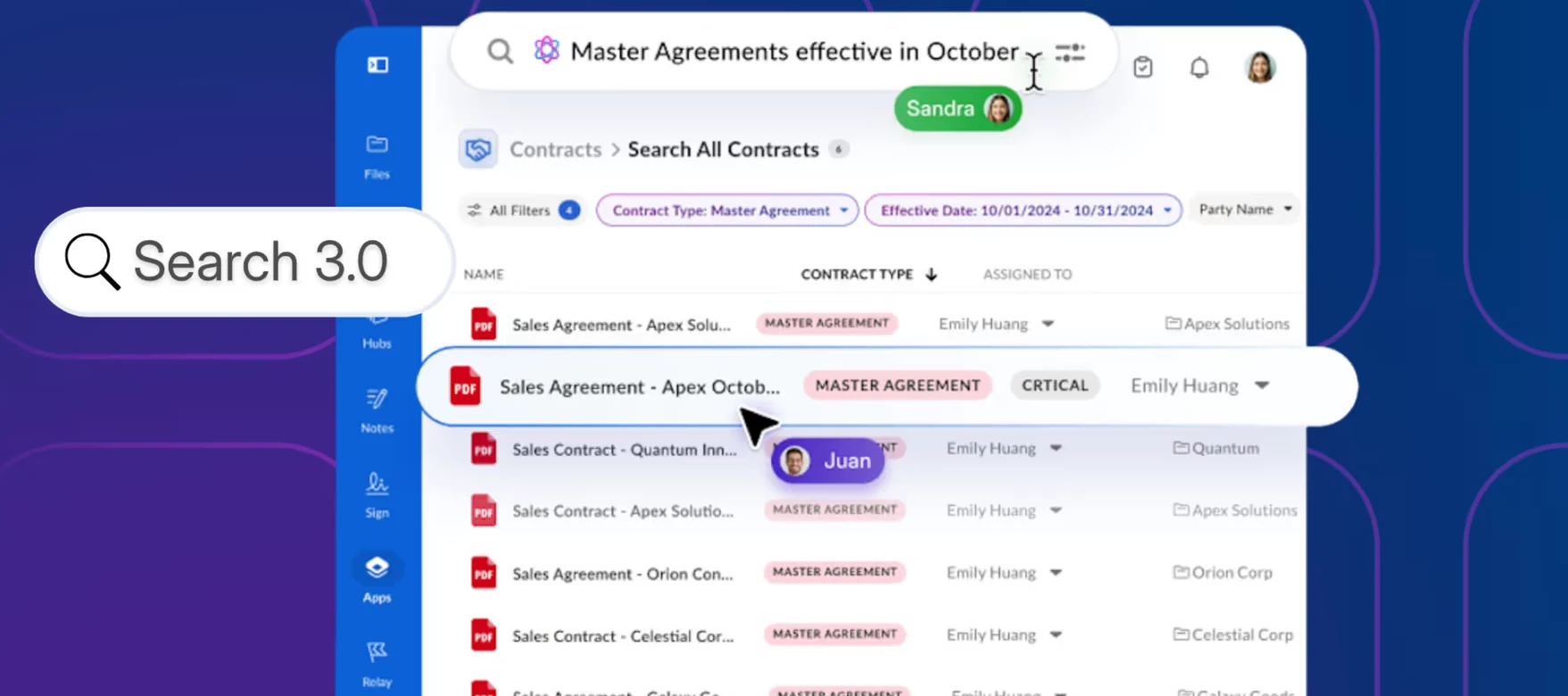
To build on our recent roundtable discussion about the Box Search 3.0 rollout, I wanted to share some exciting context regarding the foundational infrastructure upgrades powering these changes. Search has been completely updated across Box, representing a major infrastructure upgrade that fundamentally redefines what enterprise search can actually do.


Key highlights of Box Search 3.0:

  • 4x to 10x Faster: Experience 4–10x lower latency across Quick and Full Search.

  • Indexing in Seconds: Newly uploaded files become searchable in seconds instead of 15 minutes.

  • Built for AI: Exposes context retrieval via Box APIs for instant, accurate AI agent searches.

  • Global & Developer Ready: Stronger non-English support and simple public APIs for custom apps.

For those who want to dive deeper into the performance metrics and technical details of Search 3.0, I highly recommend checking out the full announcement blog post:

👉 Faster search in Box supports users and AI agents