Question

Sending file from email to box

  • February 17, 2026
  • 1 reply
  • 5 views

Is there a way to send a file by e-mail (Outlook) to dedicated Box folder?

1 reply

Jey Bueno Box
  • Community Manager
  • February 18, 2026

👋 Hi ​@Jurijs, welcome to the Box Community!


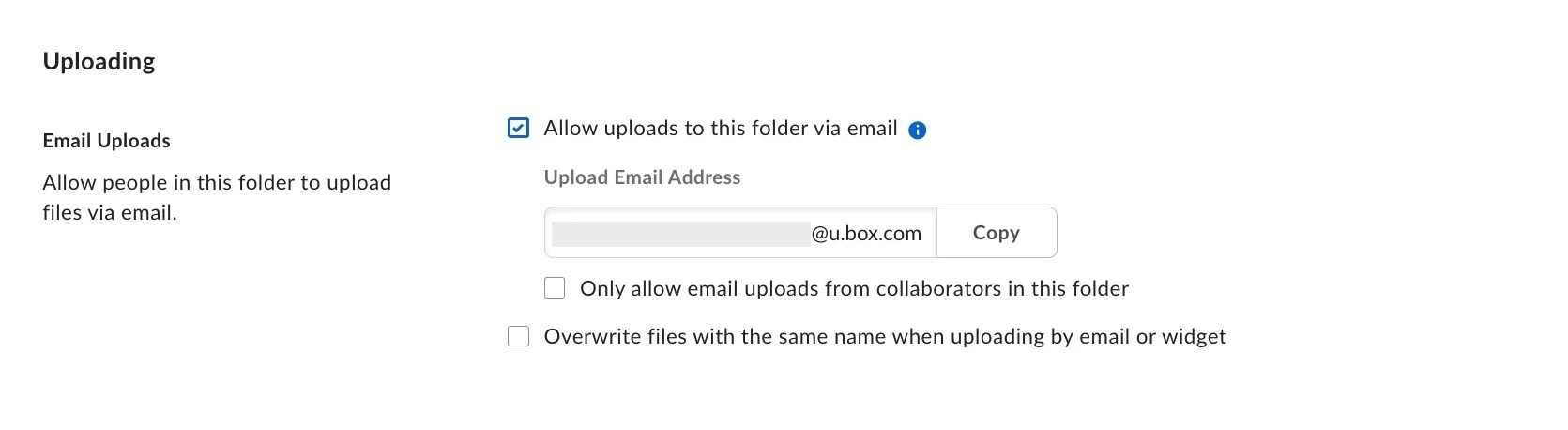
If your Box Administrator allows email uploads, you can upload files or send attachments to a specific Box folder by email when you enable the Allow uploads to this folder via email option.


To enable email uploads for a folder:

  1. In the Files window, right-click the folder and select Settings.
  2. In the Uploading section, next to Email Uploads, check Allow uploads to this folder via email. Under Upload Email Address, Box displays a unique email address.


  3. Optionally: Select "Only allow email uploads from collaborators in this folder
  4. To upload files into the folder, send files to this address. You can copy this email address to your clipboard and enter it as a contact in your email address book, or simply paste it into the "To" line of an email with attachments.


Please visit Upload to Box Through Email to learn more.


Let us know if you have other inquiries. We’re here to help!