
Question

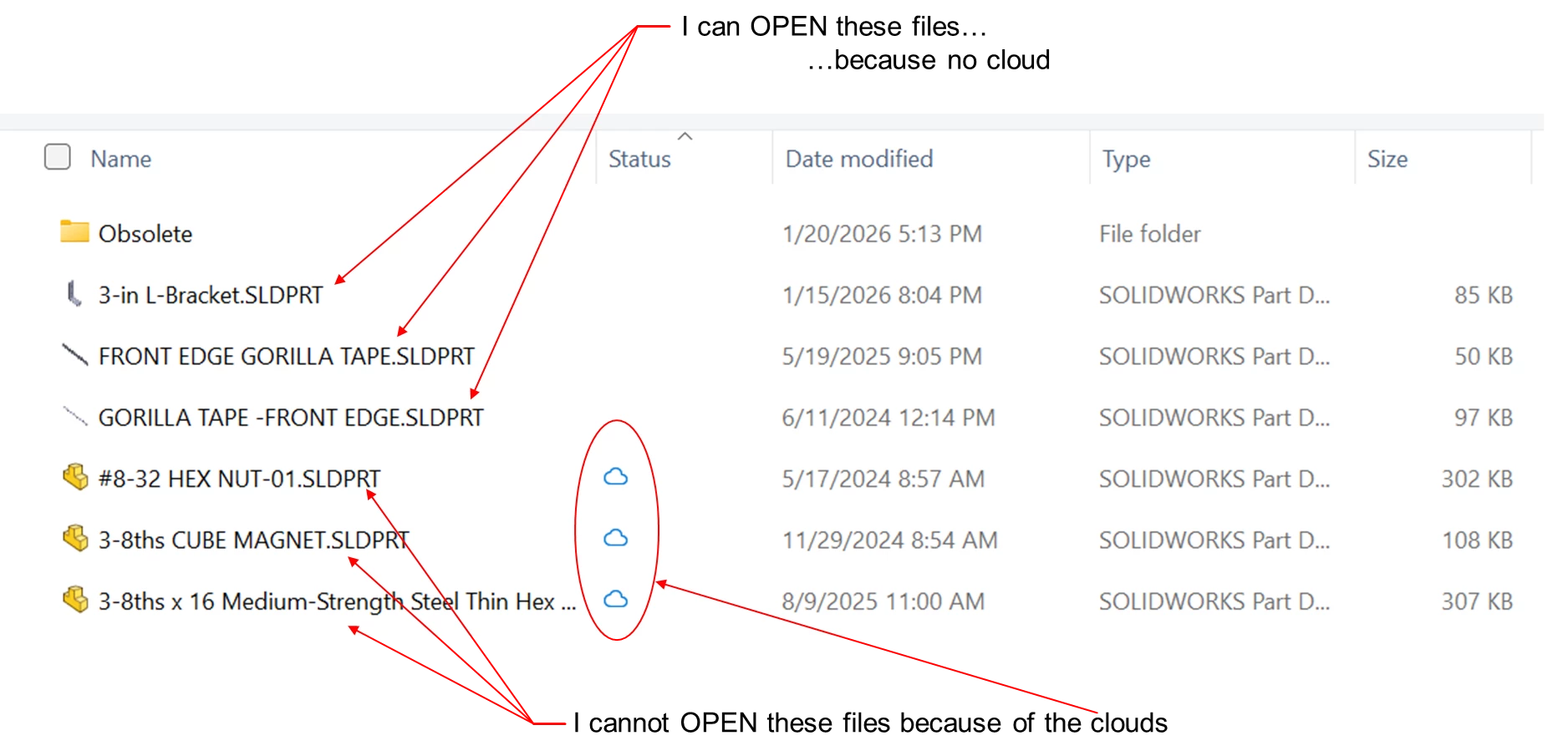
How can I change "Status"?

  • March 10, 2026
  • 4 replies
  • 40 views

I am using SolidWorks CAD software and trying to Open these files through the Box Drive on my PC. I can see everything there and in the original proper structure but cannot open the ones with clouds.

These are all my own files that I share with one other collaborator. I have used Box for this for the past 2 years and had no problems. Recently we had to move the files to a new account and since then most (but not all) of my files have these clouds under the “Status” heading and I can no longer open them.

4 replies

Jey Bueno Box
  • Community Manager
  • March 10, 2026

👋 Hi ​@jwhite, welcome to the Box Community!


The blue cloud icon indicates that an item is up to date in Box and available online only. Please log in to your Box account via the web app to access those files. You may also check out the Box Drive Icons and File or Folder Status section in the Using Box Drive Basics article to learn more.


If you need offline access, you can mark content in Box Drive to make it available offline. See Making Content Available Offline for step-by-step instructions.


Let us know if you have any other concerns.


  • Author
  • New Participant
  • March 10, 2026

Thank you for that reply. I was logged into Box, but I took your suggestion to log in again, so I logged out. But then when I tried to log in again by entering my name and email address, the login screen popped back, "Email address is not valid." I only have one email address and, yes, I’m certain I typed it correctly. Actually, I did it manually and using auto-fill, which I know is correct, and it consistently comes back with the same message.
Any ideas what that’s about?


  • Author
  • New Participant
  • March 10, 2026

UPDATE

I closed all the Box windows I had open and tried to login again and this time it worked. That’s the good news. The bad news is that the clouds are still there on 99% of my files, just as before.

Any other ideas on how I can clear the clouds?


Jey Bueno Box
  • Community Manager
  • March 10, 2026

Hi ​@jwhite, thanks for your response and great to know you’re able to login.


The blue cloud icon in Box Drive means that the files are available online only. Have you tried the steps on Making Content Available Offline?


If you’re able to login to Box using browser (web app), can you please also check if you’re able to open those files online?


If not resolved and you require further troubleshooting, please submit a ticket to our Product Support. Thank you!
