Question

Boxnotes - where did the "main folder" option go?

  • August 6, 2026
  • 1 reply
  • 16 views

meghan_SM

When in a Boxnote, the three dots used to offer the option of going back to the main folder that the note lived as the first option. We eventually found it under “save location” (which is counterintuitive as this language suggests you would use this to “save the note in a new location” or maybe save the location of the note as in the form of a link or something).

The menu now has so many options that we would never use - it is frustrating to lose the one we did use.  


Does anyone have a quicker way to go to the main folder from within a Boxnote now? 

1 reply

Jey Bueno Box
Forum|alt.badge.img
  • Community Manager
  • August 6, 2026

👋 Hi ​@meghan_SM, thank you for reaching out and sharing your feedback with us! We completely understand how frustrating it can be when a familiar workflow changes.


While the More Options (⋯) menu has been reorganized and the direct "main folder" option is no longer at the very top, you can still easily access your parent folder using a couple of options:

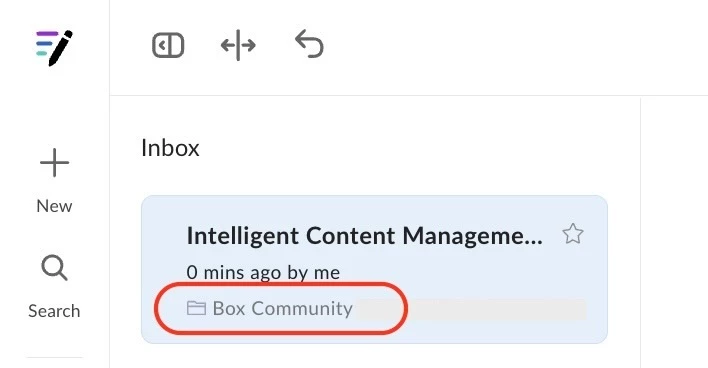
  1. Sidebar navigation (quickest): In the Notes sidebar on the left side of your screen, each note row conveniently displays the name of the folder it lives in. Simply click that parent folder name directly in the sidebar to navigate straight to it without needing any menus at all.


  2. More Options (⋯) Menu: You can still find the folder path by clicking the More Options (⋯) menu in the upper-right corner and going to Save Location > Current (representing the folder the note lives in).
     

Regarding the "Save Location" label, this setting is specifically designed for changing the default folder where new notes are saved. We appreciate your point that the current labeling can feel a bit counterintuitive when you are just trying to navigate.


Thank you again for your valuable feedback. As we continuously work to improve Box, we would really appreciate if you could share your insights with our product team in Box Pulse, which is our official platform for users’ feedback and feature requests. 🙌