Question

Box Starter Plan Collaborators

  • May 1, 2026
  • 1 reply
  • 13 views

I have a Box Starter Plan and have one collaborator but don't see where I can invite a second. Would I need to upgrade to be able to do this? 

1 reply

Jey Bueno Box
  • Community Manager
  • May 2, 2026

👋 Hi ​@sarahr, thank you for reaching out. I’d be happy to help with your questions about collaboration.


A collaborator is someone you invite to a file or folder. If your current plan meets your collaboration needs, there is no need to upgrade at this time.


To invite someone to collaborate:

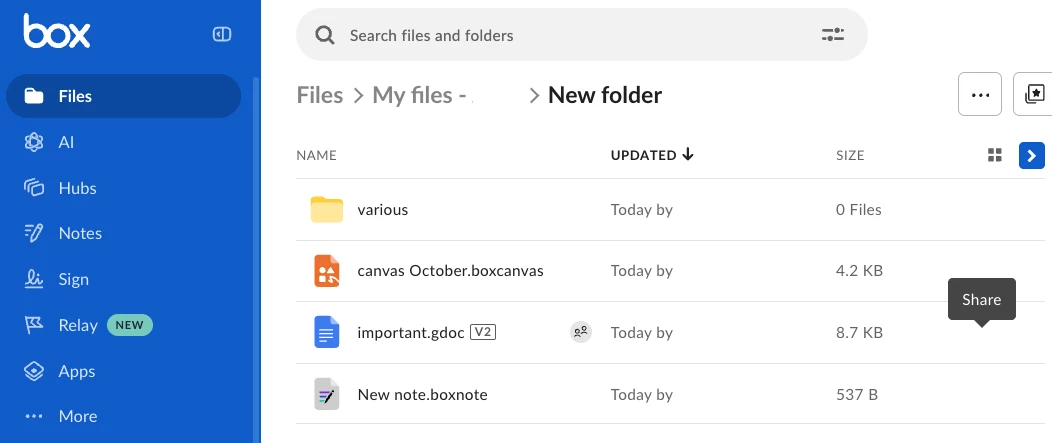
  1. Open the Share window. To do this, in your Box files view, hover over the row of the file or folder you wish to share.
  2. On the right, click Share.


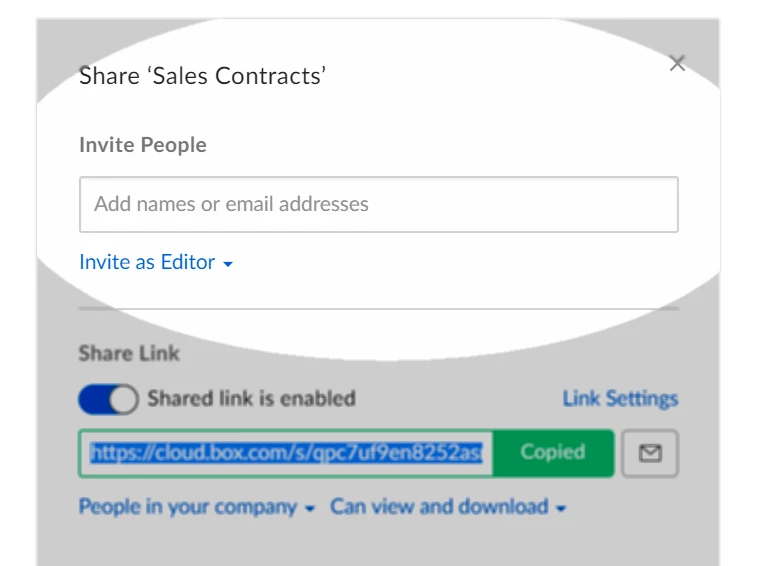
  3. The Share window opens.
  4. In the Share window, under Invite People, click Add names or email addresses.
  5. Type a collaborator's name or email address.
    • As you type, Box anticipates your intended recipient and lists corresponding email addresses. You can select the recipient you want, or continue typing the full email address.
    • When typing full email addresses, separate recipients by a horizontal space.
  6. Click the Invite as drop-down menu. Box displays a list of roles.
  7. Click the role you wish to assign to the collaborator.
  8. (Optional) In the Message field, type a message of up to 750 characters for the collaborator.
  9. Click Send.


Please note:

  • For Starter or Business accounts, each collaborator requires a license to maintain a two-way collaboration relationship. These plans do not include unlimited collaboration, so both managed users and external collaborators count toward your purchased license total.
  • Users must have a Box account, at minimum a Free Individual account, to collaborate on content in Box.
  • If you do not need to collaborate with other users, you can create shared links and provide ‘read-only’ access instead.


If you have any other questions or concerns, please let us know.