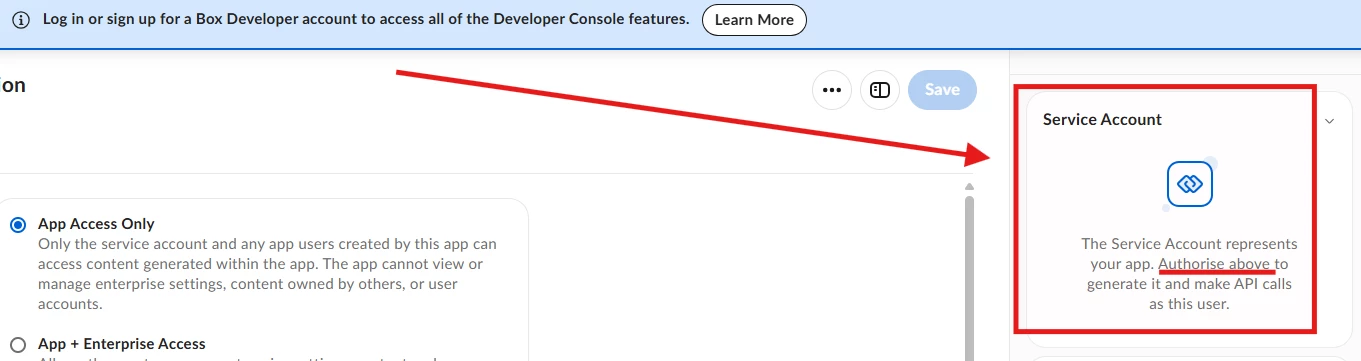
Question

How to have authorize platform app

  • September 9, 2026
  • 1 reply
  • 29 views

Hope you are doing well.

Could you please help review and authorize the following internal Box Custom App at your earliest convenience? The authorization request was submitted on Sep 6, 2026 and is currently in "Pending Authorization" status.

Here are the key application details for your lookup:

  • Application Name: MQE-DataHub-AutoSync
  • Client ID: n3rqqz6hhrk4vthshv8eihq6xicd8iwp
  • Authentication Method: Server Authentication (JWT)
  • Requested Access Level: App + Enterprise Access
  • Submission Date: September 6, 2026

Business Purpose & Use Case: This custom integration is developed for the MQE (Manufacturing Quality Engineering) data platform. It runs an automated 7×24H scheduled backend pipeline to securely fetch factory inspection datasets (FAI / SPC reports) from designated Box shared folders and ingest them into our internal Apple Cloud Infrastructure (ACI) PostgreSQL database for automated quality metrics and Cpk tracking.

All data handling strictly complies with Apple InfoSec guidelines and operates within the internal Apple Corporate Network.

Please let me know if you need any additional architecture details or manager approvals. Thank you very much for your time and support!


1 reply

Jey Bueno Box
Forum|alt.badge.img
  • Community Manager
  • September 9, 2026

Hi ​@ArthurChen, welcome to the Box Community! 👋


To help clarify the authorization process: Custom Applications (including Server Authentication / JWT apps) must be reviewed and authorized directly by your own organization’s Box Primary Admin or an authorized Co-Admin within your company’s Box Enterprise.


For security and governance reasons, Box Support and the Box Community team cannot authorize custom applications or grant enterprise-level access on behalf of your organization.


Next steps for you and your Box Admin

  1. Contact your internal Box Admin:
    Please reach out to your organization’s internal IT department or Box Primary Admin and share the application details you provided here (Application Name: MQE-DataHub-AutoSync, Client ID: n3rqqz6hhrk4vthshv8eihq6xicd8iwp, and the requested scopes/access levels).

  2. Admin authorization instructions:
    Your Box Admin can authorize the application by following these steps in the Box Admin Console:

    • Log in to the Box Admin Console.
    • In the left sidebar, navigate to Platform (or Apps > Custom Apps).
    • Select the Platform Apps tab (or Server Authentication Apps).
    • Locate your application under the Pending Authorization queue, or click Add + / Authorize New App and enter your Client ID (n3rqqz6hhrk4vthshv8eihq6xicd8iwp).
    • Review the requested permissions and click Authorize.


Once your Admin completes the authorization in the Admin Console, your application’s status will change from “Pending Authorization” to “Authorized,” and your automated backend service will be able to generate access tokens and connect to Box.


Please let us know if you or your admin run into any technical issues during the setup!