Solved

Updating payment method

  • June 25, 2025
  • 13 replies
  • 243 views

  • New Participant

Hello,


Unfortunately I have an outstanding invoice as my credit card has changed,

Unfortunately, I always get this error when I try to update my card at https://app.box.com/update.


An error has occurred while processing your enquiry.

We were unable to process your enquiry. Please check that all fields are filled in correctly and try again, or visit support.box.com for further assistance.


I have also sent an e-mail to billing@box.com twice without success.

Best answer by Jey Bueno Box

👋 Hi ​@ahu, welcome to the Box Community! I appreciate you keeping an eye on your account, and I'm sorry to hear you're encountering an issue updating your payment method.


For this general error when updating your card online, we highly recommend contacting your card issuer first to ensure there are no holds on the card (e.g., transaction limits, sufficient funds, no mismatched card information, etc.).


Note: For American Express cards, we require the 4-digit CVV code on the front.


For some reason, we haven’t received the ticket you submitted to billing@box.com. If there are no issues on your issuer or bank’s end and you’re still unable to update your payment method online, please reach out to our Billing Support through these channels for further assistance:


ReferenceUpdating your Credit Card Information


Feel free to reach out if you have any other concerns. 😊

13 replies

Jey Bueno Box
  • Community Manager
  • Answer
  • June 26, 2025

👋 Hi ​@ahu, welcome to the Box Community! I appreciate you keeping an eye on your account, and I'm sorry to hear you're encountering an issue updating your payment method.


For this general error when updating your card online, we highly recommend contacting your card issuer first to ensure there are no holds on the card (e.g., transaction limits, sufficient funds, no mismatched card information, etc.).


Note: For American Express cards, we require the 4-digit CVV code on the front.


For some reason, we haven’t received the ticket you submitted to billing@box.com. If there are no issues on your issuer or bank’s end and you’re still unable to update your payment method online, please reach out to our Billing Support through these channels for further assistance:


ReferenceUpdating your Credit Card Information


Feel free to reach out if you have any other concerns. 😊


  • Author
  • New Participant
  • June 26, 2025

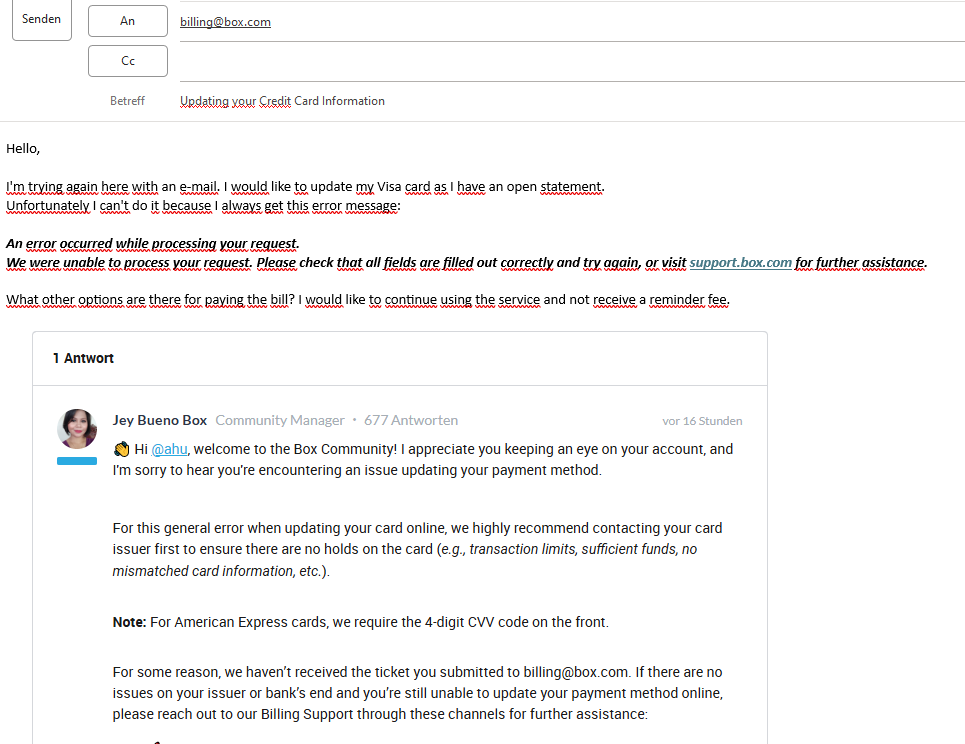
Hello,

I have sent another e-mail today (see screen) because I still have problems updating my VISA, unfortunately the card does not work for you with all other services such as Microsoft, Amazon, Paypal no matter where!

What else can I do?

Thank you


Jey Bueno Box
  • Community Manager
  • June 26, 2025

Dear @ahu, thank you for bringing this to our attention.


As we still haven’t received the ticket, I’ve submitted a case on your behalf for further assistance. Once it’s assigned to a Billing representative, they will reach out to investigate whether the error is internal and to manually update your payment method and process the payment.


In the meantime, please keep an eye out for a follow-up email from them.


Looking forward to getting this resolved soon. 😊


Invoice says “For additional Billing information or to pay via a credit card, please visit our support site: support.box.com” but the link is to “file:///C|Users/Downloads/support.box.com”, not to a valid URL.  Replacing the | with a : doesn’t help.


Jey Bueno Box
  • Community Manager
  • July 14, 2025

Hi ​@Peter M. Brown, welcome to the Box Community! I’ve moved your comment to this topic.


For any issue processing the payment or updating the payment method online, kindly reach out to our Billing team through these channels for assistance:


We look forward to getting this sorted out. 😊


  • New Member
  • August 27, 2025

When I try to register my credit card, an error occurs and I cannot proceed.

There is absolutely no issue with the entered information or with the use of the card.


Jey Bueno Box
  • Community Manager
  • August 28, 2025

👋 Hi ​@KMN, welcome to the Box Community! I’ve moved your post to a related topic. Sorry to hear you ran into an issue while registering your payment method.


I see you’ve already submitted a ticket to our Billing team to help set up your Box account. You can reply to that case to reopen it and request assistance with adding your payment method; or you’re welcome to submit a new ticket directly to the Billing team.


Please refer to the contact details and submission link above. I look forward to seeing this resolved for you soon. 😊


  • New Member
  • August 29, 2025

After trying the upgrade process for the business plan, I received the following error message.
“We were unable to process your payment information. ”
However, the information I entered is correct. Are credit cards issued in Japan not accepted?


Jey Bueno Box
  • Community Manager
  • August 29, 2025

Dear ​@whiterabbit, I’ve moved your post to this related topic about payment method. We sincerely apologize for any inconvenience this may have caused as you’re still not to be able to proceed with your upgrade.


As mentioned prior, for further assistance, we kindly recommend reaching out to our Billing Team at billing@box.com. Other support channels for Billing are stated above this thread. Credit cards issued in Japan including JCB are accepted. However, since you're experiencing issues registering your card, our Billing Team will be best equipped to investigate and help resolve the matter.


In some cases, cards may require authorization from the issuing bank or may be temporarily flagged due to unsuccessful or multiple attempts. Our Billing Team can look into these possibilities and guide you through the next steps.


Thank you again for your patience and understanding. We truly appreciate it.


  • New Member
  • January 10, 2026

Last payment has been declined (set on a card we’re not using frequentyly anymore) and I am trying to add my new credit card details for in the "Add New Payment" . I have entered all the details correctly, still I get an error "There was an error processing your request.

We were unable to process your payment information. Please double check that all fields have been filled out correctly and try again, or visit support.box.com for further assistance."

I keep receiving the same error message:
 

“There was an error processing your request.

We were unable to process your request. Please double-check that all fields are filled out correctly and try again, or visit support.box.com for further assistance.”


How do I solve this problem of adding my new credit card details? Meanwhile, is there a different method to settle my billing debt?


Thank you.


Jey Bueno Box
  • Community Manager
  • January 12, 2026

👋 Hi ​@sruggiero, welcome to the Box Community! I’ve moved your post to this appropriate thread.


As noted in the pinned post above:


For this general error when updating your card online, we highly recommend contacting your card issuer first to ensure there are no holds on the card (e.g., transaction limits, sufficient funds, no mismatched card information, etc.).


Note: For American Express cards, we require the 4-digit CVV code on the front.


If there are no issues on your issuer or bank’s end and you’re still unable to update your payment method online, please reach out to our Billing Support through these channels for further assistance:


ReferenceUpdating your Credit Card Information


For accounts created online, we only accept credit card payments. Other payment methods are available for contracted accounts. You can check the Payment Methods Accepted by Box article for more details.


If you have any other questions, feel free to reach out to us.


  • New Member
  • January 16, 2026

新規申込をしたいのですが、

要求の処理中にエラーが発生しました。

お支払い情報を処理できませんでした。すべてのフィールドの入力内容が正しいことを再確認し、もう一度実行してください。サポートが必要な場合は、support.box.comを参照してください。

とメッセージが出てしまいます。

カードはVISAカードで、他のオンライン決済でも問題なく使えております。

また、全てを英語で記入した場合も同様に上記のエラーメッセージが出てしまいました。

------

When I tried to make a new application,

an error message below occurred while processing your request.

"Payment information could not be processed. Please double check that all fields are filled in correctly and try again. If you need assistance, please visit support.box.com."

Our company's card is VISA card, and valid in other online payments.

I tried to register either in Japanese or in English, but all of them did not work.


Jey Bueno Box
  • Community Manager
  • January 16, 2026

👋 Hi ​@ttt, welcome to the Box Community! I’ve moved your post to this appropriate topic.


Common card errors are outlined in the pinned answer above this thread. If you’re trying to upgrade and running into issues on the payment page, please reach out to our Billing Team at billing@box.com for assistance. You can also use the other contact options listed above.


We appreciate your patience, and I hope this gets resolved for you soon.