質問

Duo Security SSO setup

  • February 27, 2026
  • 1 の返信
  • 15 ビュー

I would like to integrate box and Duo Security via SAML.

I can’t find Duo as an IDP.

Please help.


1 の返信

Jey Bueno Box
  • Community Manager
  • February 27, 2026

👋 Hi ​@taasai, welcome to the Box Community! I’d be glad to assist.


When setting up single sign-on for your organization, please review the prerequisites:

  • A Business or Enterprise Box account.
  • Primary administrator or a managed user with co-admin permissions and at least the following privileges in the Reports and Settings section selected:
    • View settings and apps for your company
    • Edit settings and apps for your company


To Configure Single Sign-On:

  1. Go to Admin Console > Enterprise Settings.
  2. Click the User Settings tab. 
  3. In the Configure Single Sign-On (SSO) for All Users section, click Configure.
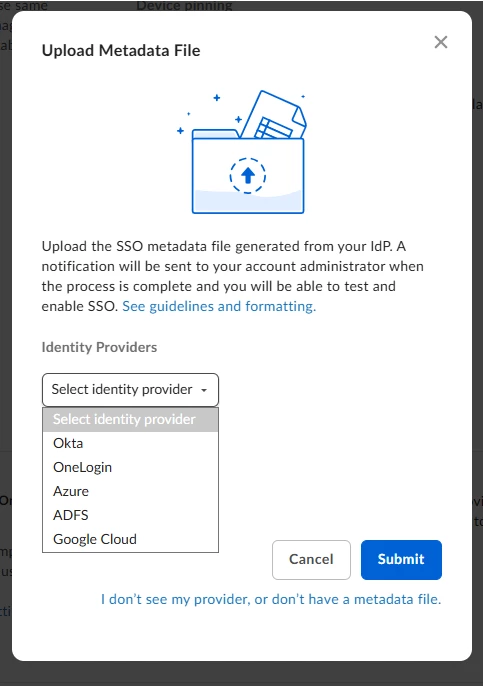
  4. Select your Identity Provider (IdP).
  5. Upload your IdP's SSO metadata file.
    • If you do not have a metadata file or if you need your metadata file updated, use the Box SSO Setup Support Form to have Box help you set up SSO.
  6. Click Submit.


Please visit Setting Up Single Sign-On (SSO) for Your Organization article to learn more.


Please also note that Box does not support SSO for trial or free developer accounts. Instead, use Sandbox Enterprise.


If you have any other concerns, feel free to reach out.


