Solved

Charging for Users When Seats are Available

  • October 28, 2025
  • 33 replies
  • 1136 views

Show first post

33 replies

  • New Member
  • April 20, 2026

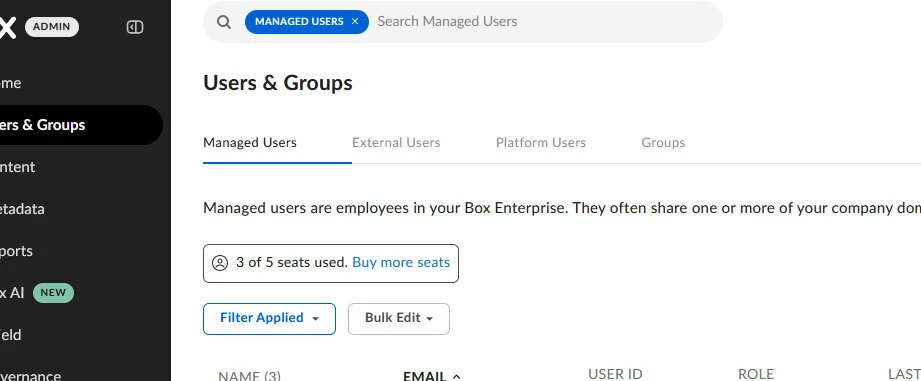
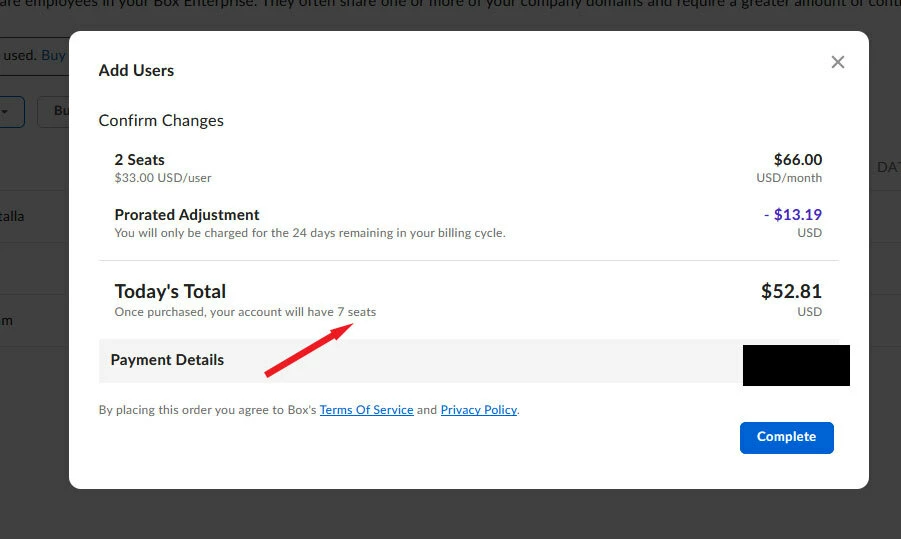
Purchased seat, but cannot assign to new user.  It shows i have the license, but cannot assign new users without buying more licenses.   


Jey Bueno Box
  • Community Manager
  • April 20, 2026

👋 Hi ​@burnout, welcome to the Box Community! I’ve moved your post to this relevant thread.


Please refer to the pinned answer at the top of this thread. To reassure you, as long as the users you add do not exceed your available licenses, no additional charges will be applied.


I can also confirm that your managed users were successfully added. Your account now fully utilizes all purchased seats.


If you have any other questions or need further assistance, feel free to let us know.


ユーザーの追加方法

未使用ライセンスが2つありユーザー追加を行おうとすると、

新たなライセンスの契約に同意を求められます。

新規ユーザーに未使用ライセンスの割り当てる方法を教えてください。

box管理者サイトのユーザーとグループのユーザーの追加(手動でユーザーを追加)から

操作を行いました。


How to Add a User

When attempting to add a user with two unused licenses,

I am prompted to agree to a new license agreement.

Please tell me how to assign the unused licenses to the new user.

I performed the operation from the "Add User (Manual User Addition)" section of the users and groups in the Box administrator site.


Jey Bueno Box
  • Community Manager
  • May 21, 2026

👋 Hi ​@朝日工業株式会社, welcome to the Box Community! I’ve moved your post to this relevant topic.


I can confirm that you have seats/licenses available. You may continue adding your managed users, and rest assured that as long as seats remain available, you can add users without incurring any additional charges to your account.


Thank you for your patience, and please don’t hesitate to reach out if you have any other questions or concerns.


  • New Member
  • May 22, 2026

I have the same problem. I tried in incognito mode. This is urgent.


Jey Bueno Box
  • Community Manager
  • May 22, 2026

👋 Hi ​@vmag, welcome to the Box Community!


Please refer to the pinned answer at the top of this thread. I can confirm you have 2 available seats. To reassure you, as long as the users you add do not exceed your available licenses, no additional charges will be applied.


Thank you, and let us know if you have any other concerns.


  • New Member
  • May 26, 2026

Hello,

I am the primary admin of a Box Business Plus account.

I am experiencing the following issues and would like to confirm if they are related:

Background:

This account was originally a personal Box account that was upgraded to Business Plus. I would like to confirm whether this upgrade process may be causing any of the issues below.

Issue 1: Payment screen appears when adding a managed user
My account shows 1/3 licenses used ("Account & Billing" page). However, when I try to add a new managed user, a payment confirmation screen appears requesting an additional charge (1 seat + tax). The screen states "Once purchased, your account will have 4 seats." I should have 2 remaining seats available without additional payment.

Issue 2: Data inconsistency between Insights and Users & Groups

  • Insights page shows: Managed Users = 0, Remaining Licenses = 0
  • Users & Groups page shows: myself as a managed admin user
  • Account & Billing page shows: 1/3 licenses used

These three pages are showing inconsistent information, which may be related to Issue 1.

Could you please investigate whether the personal account upgrade caused any of these issues, and advise on how to add the remaining 2 users without additional charges?

Thank you.


Jey Bueno Box
  • Community Manager
  • May 26, 2026

👋 Hi ​@Asamix, welcome to the Box Community, and thanks for reaching out.


I can confirm that you currently have two available licenses, so you can add your managed users at no additional charge. As long as seats remain available on your account, you can continue adding users without incurring extra costs.


The data inconsistency may be related to the recent upgrade as your account transitions from personal to business. Please check the account again a little later to confirm that the changes have been fully applied.


If you have any other questions or concerns, please feel free to reach out.