

Question

webhook permission denied despite app config setting activated and app authorized

  • May 22, 2025
  • 7 replies
  • 38 views

Forum|alt.badge.img

I have a JWT app with the following settings:
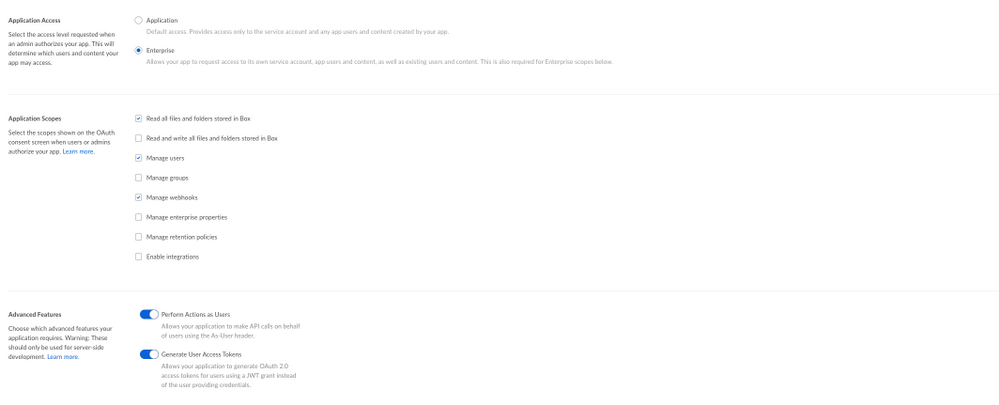
BOX_17di7aiywhqbzdf8iwaobytsbi7rfzqf.png


I have confirmed with my box admin that these settings are authorized:
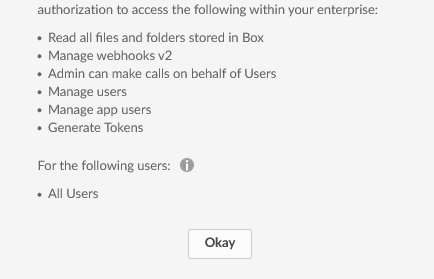
 

BOX_xpgxta4hse1ls6why0juley8sigkzi5s.png


I connect to the api using the python sdk, using three different accounts, all of which do not have permission to create webhooks. The service account, an app user, and my own account using a developer token. I create the service account client as follows:

config = json.load(open('app_config.json'))
CLIENT_ID = config['boxAppSettings']['clientID']
CLIENT_SECRET = config['boxAppSettings']['clientSecret']
PUBLIC_KEY_ID = config['boxAppSettings']['appAuth']['publicKeyID']
PRIVATE_KEY = config['boxAppSettings']['appAuth']['privateKey']
PASSPHRASE = config['boxAppSettings']['appAuth']['passphrase']
ENTERPRISE_ID = config['enterpriseID']

auth = JWTAuth(CLIENT_ID, CLIENT_SECRET, ENTERPRISE_ID, PUBLIC_KEY_ID,rsa_private_key_data=PRIVATE_KEY,rsa_private_key_passphrase=PASSPHRASE)
auth.authenticate_instance()

client = Client(auth)

I then get a client where the service account is acting on behalf of an app user I've created:

appuser = client.user(user_id='XXXXXXXXXX')
appClient = client.as_user(appuser)

I then attempt to create a webhook on a folder:

folder_id = 'XXXXXXXXXX'
resource = appClient.folder(folder_id=folder_id)
notification_url = 'a_real_url_that_you_cant_have'
hooks = ['SHARED_LINK.CREATED','SHARED_LINK.DELETED']

webhook = appClient.create_webhook(resource, hooks, notification_url)


The service account and app user were added as co-owners on the folder that is used in this call. The folder is retrieved successfully so I am assuming authorization went ok. However, no matter which client I use, the service account, the app user, or a different DevelopmentClient, the api returns the 403. Am I doing something wrong?


7 replies

Forum|alt.badge.img

This sounds very similar to this issue:https://community.box.com/t5/Platform-and-Development-Forum/Web-Integration-Token-not-working-to-create-Webhooks/td-p/59171


One thing we've noticed is that we're able to set hooks with certain event triggers: at least FOLDER.RENAMED seems to work. However we cannot include shared_link triggers, and have also tried creating the hook and updating the triggers with a PUT, which still returns the 403. 


Forum|alt.badge.img

  If you haven't already please open a ticket at support.box.com with all relevant info so we can help further investigate! 


Best, 

Kourtney

Box Technical Support Engineer


Forum|alt.badge.img

 I hadn't yet made a ticket, as I was working with a box admin here to see if we could find where things were going wrong. We've been unsuccessful, so I'll open a ticket. Thanks.


Forum|alt.badge.img

  Sounds good!! I'm trying to reproduce this right now and will let you know if I figure it out 🙂 


Kourtney 

Box Technical Support Engineer


Forum|alt.badge.img

  Figured it out! You need the read and write scope enabled as well in order to use the shared link actions. 


Forum|alt.badge.img

 working on getting the scope change re-authed then I'll get back to you. Thanks.


Forum|alt.badge.img

 Ok, I have confirmed that it works for JWT auth with read/write permission.


A couple of questions:

1) Why would read/write access be required to create webhooks with shared_link triggers? This is not obvious to me since there's a separate "manage webhooks" scope. Nothing about creating or receiving a webhook has anything to do with reading or writing to a file or folder?


2) Why is the behavior different for standard oauth2 with a dev token? I was able to generate webhooks with the shared_link triggers before I went into getting JWT working. I'm pretty sure the scope was read only as well.