

Question

Getting a user

  • May 22, 2025
  • 3 replies
  • 9 views

Forum|alt.badge.img

For work with the service I use gem 'boxr'. For uploading files, authentication is required, which I perform through JWT, as described in the documentation

user = Boxr::get_user_token(user_id, private_key: ENV['JWT_PRIVATE_KEY'], private_key_password: ENV['JWT_PRIVATE_KEY_PASSWORD'], public_key_id: ENV['JWT_PUBLIC_KEY_ID'], client_id: ENV['BOX_CLIENT_ID'], client_secret: ENV['BOX_CLIENT_SECRET'])


In user_id, you must pass the id of the user who has access to the application. There is a user admin (owner, default, say his id is 1) and there is a second one, which I created (id = 2).
If I pass user_id = 2 (the second user I created, not the admin), I get no errors and can continue to work.
If I pass user_id = 1 (admin id), I get the error:


{"error":"invalid_request","error_description":"Cannot obtain token based on the enterprise configuration for your app»}


3 replies

Forum|alt.badge.img

 I just tested this, but I was not able to reproduce the error you are getting. I requested tokens for a user and an admin using JWT authentication and the Ruby SDK. I shared the code I used to test with below.


I think the issue you are seeing might be related to your application access and application scopes settings.


Can you please confirm if the following settings are enabled for your application?

  • Application Access set to "Enterprise".
  • "Manage Users", "Manage Groups", and "Manage Enterprise Properties" enabled within the Application Scopes section.
  • "Generate User Access Tokens" enabled within the Advanced Features section.


require 'boxr' #Box Ruby SDK
require 'json'

def getAccessToken
  #Read JWT credentials
  #You can generate JWT credentials within the developer console on the app configuration page
  file = File.read('credentials.json')
  credentialsHash = JSON.parse(file)

  #Parse credentials
  privateKey = credentialsHash['boxAppSettings']['appAuth']['privateKey'].to_s
  publicKeyId = credentialsHash['boxAppSettings']['appAuth']['publicKeyID'].to_s
  privateKeyPassword = credentialsHash['boxAppSettings']['appAuth']['passphrase'].to_s
  enterpriseId = credentialsHash['enterpriseID'].to_s
  clientId = credentialsHash['boxAppSettings']['clientID'].to_s
  clientSecret = credentialsHash['boxAppSettings']['clientSecret'].to_s
  userId = "REPLACE_WITH_USER_TOKEN"
  adminId = "REPLACE_WIHT_ADMIN_TOKEN"

  #Request enterprise token
  responseEnterpriseToken = Boxr::get_enterprise_token(private_key: privateKey, private_key_password: privateKeyPassword, public_key_id: publicKeyId, enterprise_id: enterpriseId, client_id: clientId, client_secret: clientSecret)
  puts responseEnterpriseToken.access_token.to_s
  
  #Request user token
  responseUserToken = Boxr::get_user_token(userId, private_key: privateKey, private_key_password: privateKeyPassword, public_key_id: publicKeyId, client_id: clientId, client_secret: clientSecret)
  puts responseUserToken.access_token.to_s
  
  #Request admin user token
  responseAdminToken = Boxr::get_user_token(adminId, private_key: privateKey, private_key_password: privateKeyPassword, public_key_id: publicKeyId, client_id: clientId, client_secret: clientSecret)
  puts responseAdminToken.access_token.to_s
end

getAccessToken


Forum|alt.badge.img

I assumed that this is due to my settings in the service. I did everything that you said, but I'm still getting this error.

In section "Authentication Method" i set - OAuth 2.0 with JWT (Server Authentication).

Section "Developer Token" and  "OAuth 2.0 Credentials" i I didnt change.

In section "Application Access" i set - "Enterprise" (instead "Application")

In section "Application Scopes" - "Manage Users", "Manage Groups", and "Manage Enterprise Properties" i set enabled

And finally in section "Advanced Features" I turned on "Generate User Access Tokens"

So, I saved the changes and still get this error


Forum|alt.badge.img

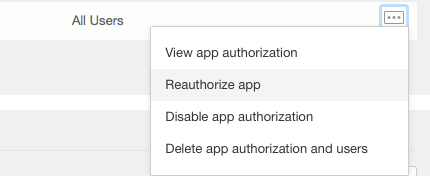
 After updating these settings, did you reauthorize your application on this page in the Admin console?


BOX_qfsjhqrv32shradjan4psn1vvnes6voq.png